 knacksnews
Top MKV Players for Mac 2025: Best for Smooth 4K Playback
Finding the perfect MKV player for Mac has never been easy. Unlike Windows, macOS doesn’t offer built-in support for MKV files, making third-party media players essential. In 2025, the demand for high-quality playback, especially with Dolby Vision support, has led to the development of several exceptional MKV players. Whether you’re watching a 4K movie, an HDR video, or an MKV file with multiple audio tracks, choosing the right media player is crucial for the best viewing experience.
This article explores the best MKV players for Mac in 2025, focusing on their features, Dolby Vision support, and the pros and cons of each option. If you're tired of struggling with choppy playback or missing features, keep reading to find the perfect MKV player for your needs.
Features That Define the Best MKV Player for Mac
The top MKV player for Mac ought to provide smooth playback, compatibility with a variety of codecs, hardware acceleration, and full integration with macOS. As MKV is a container format that can encapsulate numerous video and audio codecs, an elite player must play all formats smoothly without demanding the installation of extra plugins.
Support for Dolby Vision is a requirement for anyone who wants excellent HDR visuals. This technology is geared towards improving brightness, contrast, and color accuracy, which makes movies and TV shows more immersive. The player should also have a simple interface, options for customization, and consistent performance even with very large, high-bitrate files.
Another key feature to look for is subtitle support. A good MKV player should support various subtitle formats, such as SRT, ASS, and embedded subtitles, without any lags. Advanced players offer further control over subtitle font, size, and position settings to provide an enhanced viewing experience for foreign-language videos.
Usability can be boosted by connectivity features like AirPlay, Chromecast, and DLNA streaming, enabling users to cast MKV files onto big screens. A media library within the player to categorize movies and TV series is another practical feature provided by some top-of-the-line players.
The Best MKV Players for Mac in 2025
IINA – The Ultimate Mac-Optimized Player
IINA is arguably the best Mac MKV player, and it is designed specifically for MacOS users. Its modern interface, Touch Bar integration, and support for gestures make it feel like a native Mac application. IINA supports hardware acceleration, ensuring smooth playback of 4K and even 8K MKV files with minimal CPU usage.
Dolby Vision support ensures that HDR content looks stunning, with deep blacks and vibrant colors. Subtitle customization and picture-in-picture mode add to the overall experience. The player also supports online streaming, making it a versatile choice for users who enjoy watching content from multiple sources.
However, IINA occasionally struggles with highly compressed MKV files and may experience minor stability issues. Despite this, it remains a top contender for Mac users due to its seamless integration with macOS and extensive customization options.
VLC Media Player – The Versatile Choice
VLC Media Player has been a trusted media player for years thanks to its ability to handle nearly any file format. It effortlessly plays MKV files, supports Dolby Vision, and offers a wide range of customization options. VLC's open-source nature allows continuous improvements, making it one of the most reliable players available.
One of VLC’s key advantages is its compatibility with multiple platforms, making it a great choice for those who switch between macOS and Windows. It also has advanced subtitle options and can stream videos from online sources, including YouTube. VLC can even convert MKV files into different formats, making it a useful tool for content creators.
However, VLC’s outdated interface and occasional stuttering with high-bitrate MKV files may be a drawback for some users. Additionally, while it supports Dolby Vision, the implementation isn't as seamless as dedicated HDR-focused players.
Elmedia Player – Premium MKV Playback
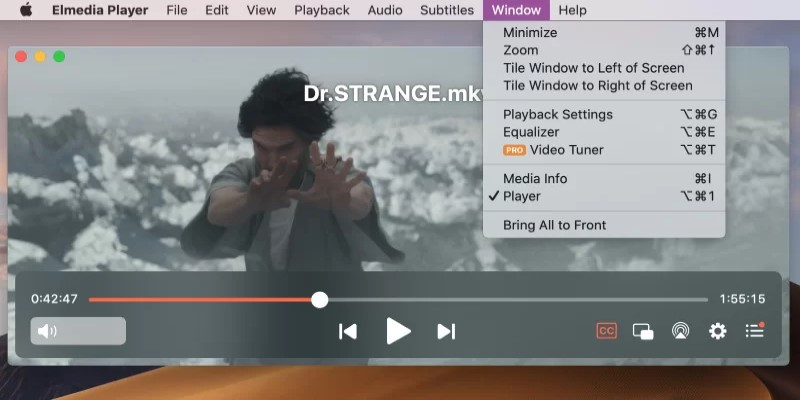
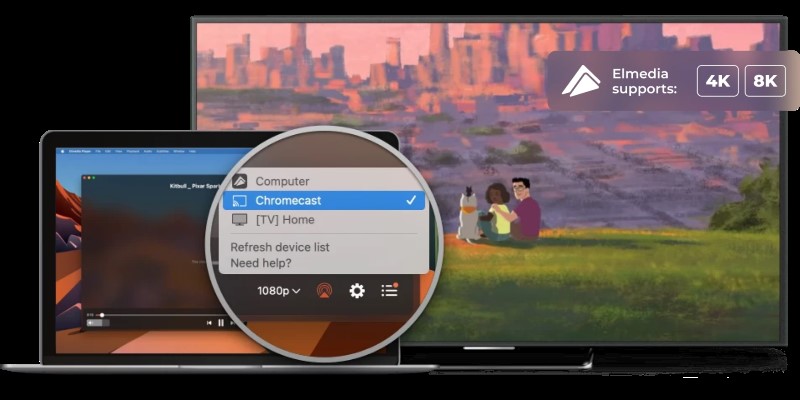
Elmedia Player is an excellent MKV player for Mac, offering a polished interface and advanced features. It supports Dolby Vision, AirPlay streaming, and extensive subtitle customization, making it a great choice for those looking for a premium viewing experience.
Elmedia Player also features hardware acceleration, ensuring that even the highest-resolution MKV files play smoothly. Its built-in browser allows users to stream online videos without leaving the application, which is a convenient addition.
While Elmedia Player offers a free version, its best features, such as 4K HDR support and hardware acceleration, are locked behind the paid version. If you don’t mind paying for a high-quality media player, Elmedia is worth considering.
Movist Pro – A Balanced Experience
Movist Pro offers a clean, intuitive interface with dual playback engines—one optimized for performance and the other for compatibility. It supports Dolby Vision, making it an excellent choice for HDR enthusiasts. The player also includes HEVC hardware decoding, ensuring smooth playback of compressed MKV files.
Movist Pro stands out for its extensive subtitle customization, offering precise control over appearance, synchronization, and positioning. It also supports network streaming, allowing users to play videos directly from FTP, SFTP, and other cloud storage services.
Movist Pro’s biggest drawback is its pricing, as the full version requires a paid subscription. However, if you want a player that balances simplicity and power, it’s a great investment.
Common Issues with MKV Playback on Mac and How to Fix Them
Despite using a high-quality MKV player, users may occasionally face playback issues on macOS. Here are some common problems and potential solutions:
Choppy Playback: If an MKV file stutters or lags, enabling hardware acceleration in the media player's settings can improve performance.
No Audio: Some MKV files use codecs that are not natively supported. Installing additional audio codecs or switching to a different player like VLC can resolve this issue.
Subtitle Issues: If subtitles don’t appear correctly, ensuring they are properly formatted (SRT, ASS) and manually loading them in the media player can help.
MKV File Not Opening: If an MKV file refuses to open, it may be corrupted. Try playing it with another media player or converting it to MP4 using VLC or HandBrake.
Conclusion
Choosing the best MKV player for Mac in 2025 depends on your needs. IINA offers the most seamless macOS experience, VLC provides unmatched versatility, Elmedia Player delivers a premium experience, Movist Pro strikes a balance between power and simplicity, and 5KPlayer provides a feature-rich free alternative.
With Dolby Vision support becoming a key feature, these players ensure that your viewing experience is top-notch. No matter which one you choose, you can enjoy smooth, high-quality MKV playback on macOS without compromise.
On this page
Features That Define the Best MKV Player for Mac The Best MKV Players for Mac in 2025 IINA – The Ultimate Mac-Optimized Player VLC Media Player – The Versatile Choice Elmedia Player – Premium MKV Playback Movist Pro – A Balanced Experience Common Issues with MKV Playback on Mac and How to Fix Them ConclusionRelated Articles

Set Up Media Streaming with DLNA in Windows
Flowframes Review: Revolutionizing AI Frame Interpolation for Videos

Everything You Need to Know About CapCut Video Upscaler

5 Best Alternatives to Media Player Classic for a Smooth Viewing Experience

Free Online Screen Recorders with Simple and Fast Export Options

Constant Contact vs. HubSpot: Which Platform Fits Your Business Needs

Cloud-Based Spreadsheet Tips: Convert Excel to Google Sheets

Improve System Speed Fast Using These Top 5 PC Optimization Tools

Extract Beautiful Color Palettes from Images Using Free Online Tools

The Best CRM Software for Real Estate Agents: Top Picks for 2025

Neat Video Explained: Noise Reduction Without the Blur