 knacksnews
Flowframes Review: Revolutionizing AI Frame Interpolation for Videos
Artificial intelligence has made massive strides in creative fields, and video processing is no exception. One of the most exciting tools for smooth motion generation is Flowframes. This AI frame interpolation tool has caught the attention of video editors, animators, and gamers who want fluid motion without the usual frame rate limitations. But does it live up to the hype? In this detailed Flowframes review, we’ll explore its core functionality, advantages, limitations, and whether it’s a tool worth adding to your workflow.
Understanding Flowframes and How It Works
Flowframes is a frame interpolation software that utilizes AI to transform low-frame-rate videos into high-frame-rate ones. It achieves this by creating new frames in between existing ones, resulting in smoother motion in videos, animations, and even game recordings. Rather than using conventional frame blending or motion estimation methods, Flowframes employs AI-driven optical flow technology to predict and fill in new frames, eliminating motion blur and stutter.
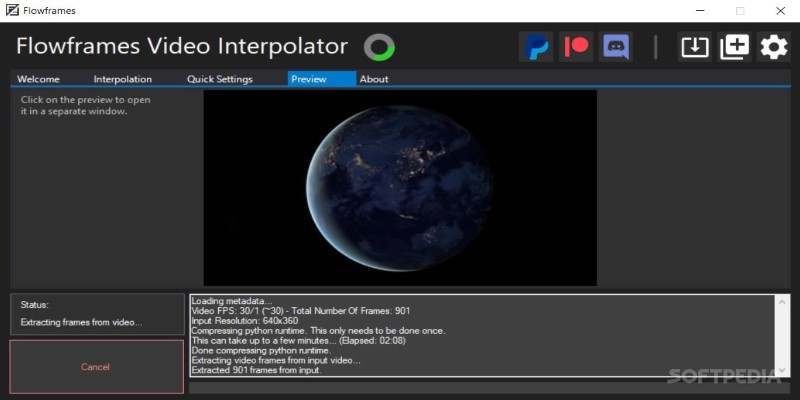
The procedure is pretty straightforward. Upload a video, define the target frame rate, and leave the rest to Flowframes. AI observes movement trends, predicts motion vectors, and fills the holes in seamlessly. It is, therefore, quite handy to fill gaps in vintage footage, create smooth slow-motion effects, and stabilize game footage up to 240 FPS.
One of the most impressive features of Flowframes is their performance in real time. With most frame interpolation techniques, processing time is usually quite substantial. Flowframes use AI acceleration, which keeps the process short. Large video files are not a problem and can easily be processed quickly, saving time waiting for outcomes. Thus, it is a desirable option for both experts and enthusiasts.
Additionally, Flowframes supports GPU acceleration, meaning that users with modern graphics cards can further speed up processing times. This makes it a great choice for those working with high-resolution videos, where smooth motion is essential for maintaining a professional look. Whether you’re working with 4K cinematic footage or gaming clips, Flowframes ensures a seamless viewing experience.
The Pros and Cons of Using Flowframes
Pros
Speed and Efficiency
Flowframes are incredibly fast compared to other interpolation software. Thanks to AI acceleration, users can process videos in significantly less time than traditional methods. The results are usually impressive, providing a major boost in smoothness and visual clarity.
Lightweight and Accessible
Another plus is that Flowframes is relatively lightweight. Unlike some high-end video editing software that demands powerful hardware, Flowframes runs efficiently on mid-range PCs. It also offers offline functionality, meaning users don’t have to rely on an internet connection to process videos.
Flexibility with AI Models
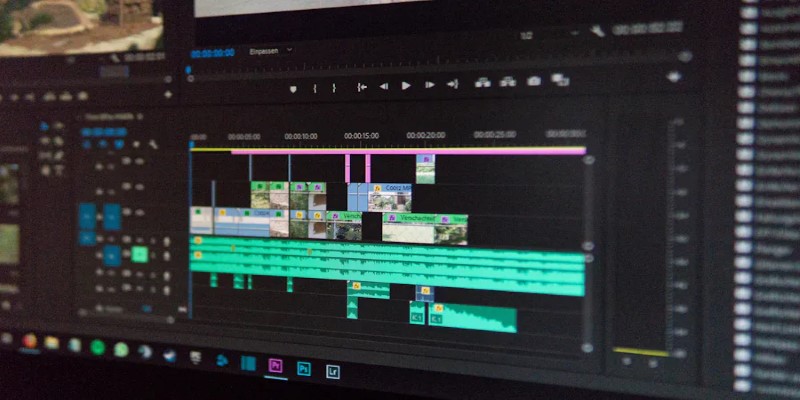
Flowframes provide a range of AI models, allowing users to test different settings to achieve the best results for their specific needs. Whether you're working with old footage, anime sequences, or gaming clips, there’s an AI model that can optimize the outcome.
Reduction of Motion Artifacts
Traditional frame interpolation often results in ghosting or blur, but the AI-driven approach in Flowframes minimizes these issues, ensuring a more natural look. This makes it ideal for high-quality content creation, where smoothness is a top priority.
User-Friendly Interface
Flowframes are easy to use, even for beginners. The straightforward interface allows users to quickly navigate through the tool's functions without a steep learning curve, which is a big plus for those who may not be experienced with advanced video editing software.
Support for Multiple Formats
Flowframes support a wide variety of video formats, making them compatible with different workflows. This versatility is a significant advantage when working with various video types, from old footage to high-quality cinematic clips.
Cons
Occasional Artifacts and Distortions
One of the major downsides of Flowframes is occasional artifacts and distortions. While the AI does a commendable job of predicting motion, there are moments when fast-moving objects result in inaccurate interpolations, leading to visual anomalies.
Lacks Advanced Video Editing Tools
Flowframes isn’t a full-fledged video editor. It specializes in interpolation but lacks additional editing tools, meaning users might still need other software for trimming, color correction, or special effects.
Not Perfect for All Video Types
AI frame interpolation isn’t always perfect for every video type. While gaming clips and slow-motion footage generally see significant improvements, certain complex scenes with erratic movements may not interpolate as smoothly. Users working with highly dynamic footage may need to tweak settings or use alternative tools to achieve the desired results.
Increased Storage Requirements
Higher frame rates demand more storage space. Since Flowframes generate additional frames, the final output file size can be considerably larger than the original, which may be a concern for those with limited storage.
Is Flowframes Worth Using?
For anyone looking to enhance their videos with smoother motion, Flowframes is a solid choice. It offers an impressive blend of speed, accuracy, and ease of use, making it a valuable asset for video editors, gamers, and animation enthusiasts. The ability to upscale frame rates effortlessly makes it a standout tool in the realm of AI-based video enhancement.
That said, it’s essential to have realistic expectations. While Flowframes delivers excellent results in most cases, it isn’t infallible. Artifacts can appear, and not all videos will benefit equally from AI interpolation. However, considering its advantages and accessibility, it’s certainly worth trying, especially for those seeking an efficient way to improve video fluidity.
Conclusion
Flowframes is an impressive AI frame interpolation tool that brings a new level of smoothness to videos. With its AI-driven approach, fast processing times, and support for multiple frame rate conversions, it’s a powerful solution for users looking to enhance motion quality. While it has some limitations, such as occasional artifacts and a lack of advanced editing tools, its overall performance makes it a worthwhile addition to any video enthusiast’s toolkit.
Whether you’re a gamer wanting higher FPS gameplay recordings, a filmmaker enhancing slow-motion shots, or an animation artist looking for fluid motion, Flowframes provides an easy and effective way to achieve professional-grade smoothness. If you’re curious about AI frame interpolation, Flowframes is definitely worth exploring.
On this page
Understanding Flowframes and How It Works The Pros and Cons of Using Flowframes Pros Speed and Efficiency Lightweight and Accessible Flexibility with AI Models Reduction of Motion Artifacts User-Friendly Interface Support for Multiple Formats Cons Occasional Artifacts and Distortions Lacks Advanced Video Editing Tools Not Perfect for All Video Types Increased Storage Requirements Is Flowframes Worth Using? ConclusionRelated Articles

5 Best Alternatives to Media Player Classic for a Smooth Viewing Experience
Neat Video Explained: Noise Reduction Without the Blur

AI job search tips
Comparing NTSC and PAL: Which Analog TV Format Was Better?

Free Online Screen Recorders with Simple and Fast Export Options

Improve System Speed Fast Using These Top 5 PC Optimization Tools
10 Game-Changing VS Code Extensions Every Developer Should Install
Flowframes Review: Revolutionizing AI Frame Interpolation for Videos

Find Your Perfect Fit: The Best Appointment Schedulers and Booking Apps
Convert 4K Videos to 1080P and Keep High Quality While Saving
Everything You Need to Know About CapCut Video Upscaler