 knacksnews
Improve System Speed Fast Using These Top 5 PC Optimization Tools
Over time, computers tend to slow down due to the buildup of unnecessary files, background apps, registry errors, and software clutter. Many users believe they need to upgrade their hardware or replace their PC altogether, but in reality, using a reliable PC cleaner tool can breathe new life into an existing system.
A good PC cleaner scans the system, deletes junk files, optimizes startup processes, and improves overall speed and performance. Below is a list of 5 of the best PC cleaner tools that help optimize systems efficiently while keeping them running smoothly.
1. CCleaner – Trusted by Millions Worldwide
CCleaner has earned a solid reputation over the years as one of the most widely used PC cleaner tools. Developed by Piriform, this software offers a blend of simplicity and power, making it suitable for both beginners and tech-savvy users.
After installation, CCleaner scans the computer for:
- Junk and temporary files
- Unused application files
- Corrupted registry entries
- Web browser cache and history
It also comes with a startup manager, software uninstaller, and browser plugin manager. For users seeking deeper cleanup, the Pro version offers real-time monitoring and automatic updates.
Pros:
- Simple interface
- Effective junk removal
- Lightweight and fast
Cons:
- Limited features in the free version
- Past concerns about bundled software (now improved)
Ideal for: Users looking for a reliable, easy-to-use cleaning tool with basic optimization features.
2. AVG TuneUp – An Advanced PC Optimizer
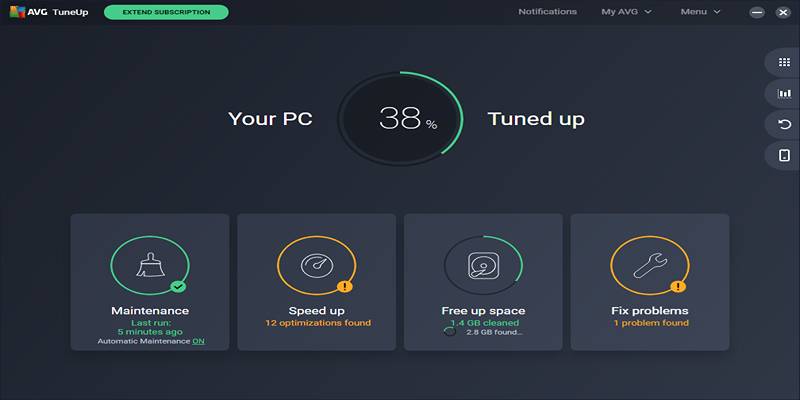
AVG TuneUp, developed by AVG Technologies, is a powerful system optimization tool designed to do more than just cleaning. This software provides a full maintenance package for users wanting better speed and system health.
What sets AVG TuneUp apart is its “Sleep Mode”, which pauses unnecessary background applications, saving system resources and improving performance. It also provides:
- Automatic cleaning of browser and disk clutter
- Registry cleaning and repair
- Software updater
- Disk defragmentation
Its automatic maintenance feature runs in the background, ensuring that performance stays optimized without user input.
Pros:
- Smart background maintenance
- Sleep Mode feature for idle apps
- Easy software updates
Cons:
- Requires a paid subscription for full features
- It can be heavier on older machines
Ideal for: Users who want a smart, hands-off solution for maintaining long-term system performance.
3. CleanMyPC – Sleek and User-Friendly
Created by MacPaw, the maker of the popular CleanMyMac software, CleanMyPC offers a sleek, intuitive interface for Windows users. It focuses on delivering an efficient cleaning experience without overwhelming the user.
CleanMyPC includes features like:
- Registry cleanup
- Hibernation file removal
- Uninstaller with leftover file detection
- Auto-start manager
What users appreciate most is its clean layout and the simplicity of its one-click scanning feature. The uninstaller tool is particularly effective, ensuring that no remnants of deleted software are left behind.
Pros:
- Clean and modern design
- Quick scans and results
- Secure file eraser included
Cons:
- No free version beyond the trial
- Lacks real-time optimization
Ideal for: Users who want a clean, visually pleasing tool focused on core cleaning functions without unnecessary extras.
4. IObit Advanced SystemCare – Full System Protection and Cleanup
IObit Advanced SystemCare offers a comprehensive suite of tools for PC optimization. It's not just a cleaner; it’s an all-in-one system utility that includes performance boosting, privacy protection, and real-time monitoring.
The software offers:
- Junk file removal
- Registry repair
- Malware protection
- System optimization
- Internet speed booster
With its "AI Mode", the tool intelligently analyzes system needs and optimizes performance accordingly. For users who prefer more control, the "Manual Mode" allows for selecting specific areas to clean or boost.
Pros:
- All-in-one solution
- Customizable optimization options
- Extra privacy and security tools
Cons:
- The free version includes ads
- May prompt installation of IObit’s other software
Ideal for: Power users who want detailed system control and built-in privacy protection along with standard cleaning features.
5. Wise Disk Cleaner – Lightweight and Fast
For users looking for a fast and lightweight tool, Wise Disk Cleaner is an excellent option. It’s designed to do exactly what the name suggests—clean up disk space by removing unnecessary files.
The software focuses on:
- Temporary internet files
- System logs
- Application leftovers
- Disk defragmentation
Wise Disk Cleaner offers a straightforward interface and supports scheduled cleanups, making it a set-it-and-forget-it solution for many users.
Pros:
- Fast performance
- Free with no bloatware
- Includes disk defrag tool
Cons:
- Lacks advanced optimization features
- No registry cleaning is included
Ideal for: Users with older or low-spec PCs who want to clean up space without using heavy software.
What to Look for in a PC Cleaner Tool
Choosing the right cleaner depends on system needs and user expectations. Some tools focus purely on junk removal, while others offer deep optimization and added protection.
Here are a few key factors to consider:
- Ease of use – A simple interface makes it easier to manage cleaning tasks.
- Extra features – Tools like auto-start management, file shredding, or software updating can be useful.
- Performance impact – Choose a lightweight option if using an older PC.
- Privacy and security – Some tools offer browser history erasing and malware detection.
How PC Cleaner Tools Help with Speed and Performance
Over time, even new PCs collect:
- Temporary files from software and internet browsing
- Unused registry entries from uninstalled apps
- Background programs that start with Windows
- Large system cache files and error logs
These can slow down performance, especially during startup or multitasking. A cleaner tool scans for such data and deletes it safely, freeing up space and memory.
Conclusion
A slow PC doesn't always mean it's time for an upgrade. Sometimes, all that’s needed is a proper system cleanup. Whether it’s the trusted CCleaner, the smart optimizer AVG TuneUp, or a lightweight solution like Wise Disk Cleaner, each of these PC cleaner tools offers value in its way. Users should evaluate their needs—whether it's deep cleaning, background optimization, or simplicity—and select a tool that fits their routine. Regular maintenance using these tools can significantly improve system speed, reduce lag, and make everyday computer use far more enjoyable.
On this page
1. CCleaner – Trusted by Millions Worldwide Pros: Cons: 2. AVG TuneUp – An Advanced PC Optimizer Pros: Cons: 3. CleanMyPC – Sleek and User-Friendly Pros: Cons: 4. IObit Advanced SystemCare – Full System Protection and Cleanup Pros: Cons: 5. Wise Disk Cleaner – Lightweight and Fast Pros: Cons: What to Look for in a PC Cleaner Tool How PC Cleaner Tools Help with Speed and Performance ConclusionRelated Articles
Cloud-Based Spreadsheet Tips: Convert Excel to Google Sheets

The Best CRM Software for Real Estate Agents: Top Picks for 2025
The 8 Best ChatGPT Alternatives for Businesses and Content Creators

Improve System Speed Fast Using These Top 5 PC Optimization Tools

Best Free Tools to Resize Bulk Images Before Uploading to WordPress
Online Engineering Tools: Free Converters for Every Measurement
Set Up Media Streaming with DLNA in Windows

Discover the Top Password Managers to Keep Your Accounts Secure

5 Best Alternatives to Media Player Classic for a Smooth Viewing Experience

Free Online Screen Recorders with Simple and Fast Export Options

Maximize Your Efficiency: The 10 Best Productivity Apps for iPad