 knacksnews
Everything You Need to Know About CapCut Video Upscaler
Video quality matters more than ever, whether for social media, professional content creation, or personal memories. Blurry, pixelated footage can ruin an otherwise perfect shot. That’s where AI-powered upscale comes in, and CapCut Video Upscaler is making waves with its ability to enhance video quality with minimal effort. If you’ve ever wondered how to transform low-resolution clips into stunning 4K, this tool offers a quick and effective solution.
CapCut, known for its user-friendly editing features, has introduced AI-driven upscaling to improve video clarity, sharpness, and overall resolution. The process is fully automated, requiring little technical knowledge while delivering impressive results. But how well does it really perform? And is it the best option available? This article takes a deep dive into CapCut’s video upscaling capabilities, reviewing its features, usability, and overall performance. You'll also find a detailed guide on how to use it effectively to achieve 4K video quality.
Understanding CapCut Video Upscaler
CapCut Video Upscaler works with artificial intelligence to upscale a video. Unlike stretching a video, which can cause distortion and loss of quality, this utility uses AI algorithms to predict missing details and then generate them. This produces a sharper, crisper video output.
In contrast to conventional upscaling techniques that rely on interpolation, AI upscaling examines frames to add new details intelligently, resulting in videos appearing naturally high-resolution. The benefit of using CapCut is that it plays well with its larger video editing suite, making it an easy choice for those who already utilize CapCut for editing.
The upscaling process works best for videos that start with a decent resolution. While it can improve extremely low-quality clips, the best results come from HD or Full HD footage that needs an extra boost to 4K. The AI works to enhance textures, refine edges, and reduce visual noise, resulting in a cleaner, professional-looking video.
Performance and Features of CapCut’s Video Upscaler
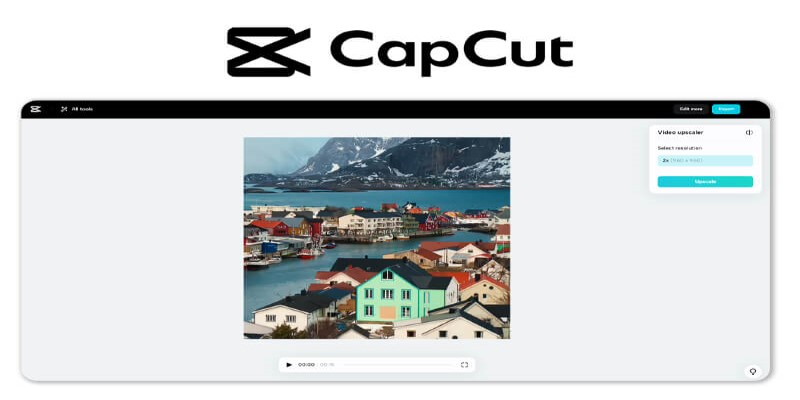
CapCut’s Video Upscaler is built to be intuitive and accessible, making it a strong choice for beginners and professionals alike. One of its main advantages is the cloud-based processing, which offloads the heavy lifting to CapCut’s servers. This means you don’t need high-end hardware to upscale your videos, unlike software that demands powerful GPUs for similar results.
In testing, CapCut performs well in sharpening details without creating unnatural artifacts. The AI algorithm successfully enhances faces, landscapes, and objects while preserving the original video’s integrity. It also minimizes pixelation and blurriness, resulting in a clearer and more detailed image. Another plus is its relatively fast processing time compared to other AI-based upscale, making it a practical tool for quick improvements.
However, there are some limitations. While CapCut does a great job of improving video resolution, it may struggle with extremely low-resolution videos, producing results that don’t always match native 4K quality. Additionally, the cloud-based nature of the tool means an internet connection is required, and processing times can vary depending on server load.
How to Upscale Videos to 4K Using CapCut Video Upscaler
Open CapCut and Import Your Video: Start by launching CapCut and uploading the video you want to enhance. You can import videos from your device or use clips stored on cloud services.
Access the Upscaling Feature: Once your video is loaded, navigate to the enhancement tools and select the Video Upscaler. The interface is user-friendly, so you won’t have trouble finding the option.
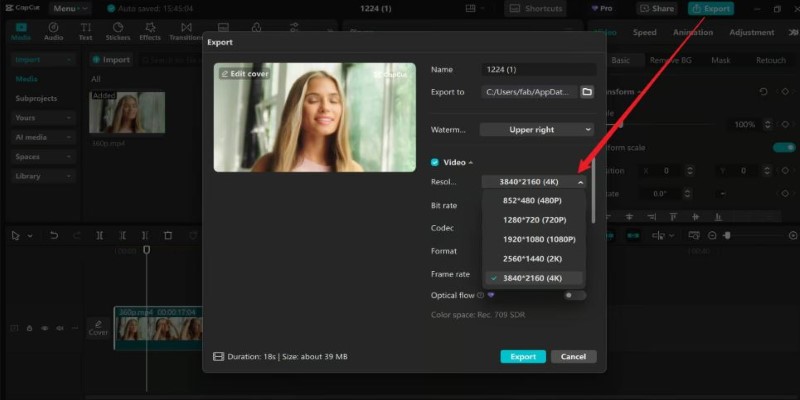
Choose the Upscaling Level: CapCut provides different levels of upscaling, including 2x, 4x, or full 4K enhancement. Choose the option that best suits your needs. If your original video is in 720p or 1080p, selecting the 4K option will give the best results.
Apply the AI Enhancement: Click to start the upscaling process. CapCut will process the video using AI algorithms, which may take a few minutes, depending on the video length and server availability.
Preview and Adjust: Once the upscaling is complete, preview the enhanced video. If needed, you can make further edits to colors, sharpness, or other parameters within CapCut.
Export the Final 4K Video: When satisfied with the results, export the video in 4K resolution. CapCut allows you to adjust export settings to optimize file size and quality.
The process is seamless and doesn’t require any technical knowledge, making it a great option for those who want high-quality videos without complicated editing steps.
Comparing CapCut Video Upscaler with Other AI Upscaling Tools
CapCut’s Video Upscaler is a solid choice, but how does it compare to other AI upscaling tools? Several software solutions, such as Topaz Video Enhance AI and Adobe Premiere Pro’s built-in upscaling, offer similar functions with varying degrees of control and output quality.
Topaz Video Enhance AI, for instance, provides more customization options for professionals who need precise control over noise reduction, sharpening, and frame interpolation. However, it requires powerful hardware and can take significantly longer to process videos. On the other hand, CapCut is cloud-based, meaning it’s faster and more accessible to users who don’t have high-end machines.
Adobe Premiere Pro also offers video upscaling but requires manual adjustments and expertise to achieve optimal results. CapCut, by contrast, simplifies the process by automating most of the work, making it an excellent choice for users looking for quick improvements without diving deep into technical details.
Overall, CapCut’s main strength lies in its balance between accessibility and performance. While professional editors might prefer more advanced software for in-depth adjustments, CapCut provides a fast and effective solution for casual users and content creators who want hassle-free 4K upscaling.
Conclusion
CapCut Video Upscaler is an impressive tool for enhancing video resolution using AI technology. It offers a simple yet effective way to upscale videos to 4K, making it an excellent choice for content creators, social media users, and professionals looking to improve video quality without investing in expensive software or hardware.
The tool's AI-driven approach makes the process effortless, with noticeable improvements in sharpness and clarity. While it may not always match the details of native 4K recordings, it provides one of the best upscaling solutions available for those who want quick and reliable enhancements. With its cloud-based system and user-friendly interface, CapCut makes 4K upscaling accessible to everyone, regardless of experience level.
Related Articles
Set Up Media Streaming with DLNA in Windows

Constant Contact vs. HubSpot: Which Platform Fits Your Business Needs

AI job search tips

How to Colorize Photos with Palette AI: A Step-by-Step Guide For beginners

Free Online Screen Recorders with Simple and Fast Export Options
Master AI Automation: 5 Ways to Automate Brain Pod AI Effectively

Streamline Your Sales: Automate Cold Emails for Woodpecker with OpenAI
Comparing NTSC and PAL: Which Analog TV Format Was Better?
Everything You Need to Know About CapCut Video Upscaler

The Best CRM Software for Real Estate Agents: Top Picks for 2025

Discover the Top Password Managers to Keep Your Accounts Secure