 knacksnews
Neat Video Explained: Noise Reduction Without the Blur
Grainy footage can ruin an otherwise great video, especially when shot in low light or with budget gear. That’s where Neat Video steps in. This noise reduction plugin has become a go-to tool for creators who want to rescue noisy clips without sacrificing image quality. Instead of blurring the whole frame like most built-in filters, Neat Video isolates and removes actual noise, preserving the crisp details.
Whether you're a solo YouTuber or a seasoned editor, this plugin can turn flawed footage into clean, professional content. It’s quiet, powerful, and surprisingly easy to work into your regular editing workflow.
What Makes Neat Video Stand Out from Basic Denoising Tools?
Most basic noise reduction tools work by smudging detail until the noise seems less visible. That’s why people end up with footage that looks like it’s been dipped in plastic. Neat Video takes a different route. It builds a detailed noise profile from the footage itself, isolating the patterns of noise instead of just guessing. This profile is then used to subtract the noise with much more accuracy, preserving edges and textures better than most built-in filters.
The key here is the Temporal Filter, which analyzes frames across time, not just a single frame. That means Neat Video compares pixel behavior across a range of frames to determine what’s actual image detail versus what’s flickering static. Noise is random, but real detail is stable. The plugin can then remove noise without losing the crisp lines that matter.
On top of that, there's fine-tuning. Users can control how much noise reduction is applied in different areas: shadows, midtones, and highlights. You also get controls for sharpening after the noise is removed—because, let's face it, a totally clean image can look a bit soft. With Neat Video, you can bring back the punch without bringing back the grain.
This isn't a one-size-fits-all filter. You can load custom noise profiles for different cameras, sensors, or even lighting situations. For example, if you shoot with a DSLR in low light one day and a mirrorless one in bright daylight the next, you can set up tailored noise profiles for each.
The plugin also supports GPU acceleration, which is important. Noise reduction is heavy on processing, and without GPU support, rendering times can be brutal. With a decent graphics card, though, Neat Video runs surprisingly fast, even on 4K footage.
Using Neat Video Inside Your Editing Workflow
Getting started with Neat Video feels technical at first, but once you understand the flow, it becomes second nature. You begin by choosing a frame that represents the noise problem well—ideally something with flat colors or a dark background. Then, inside the Neat Video interface, you select a sample area to build your noise profile. This sample should be free from edges or detail, just pure noise.
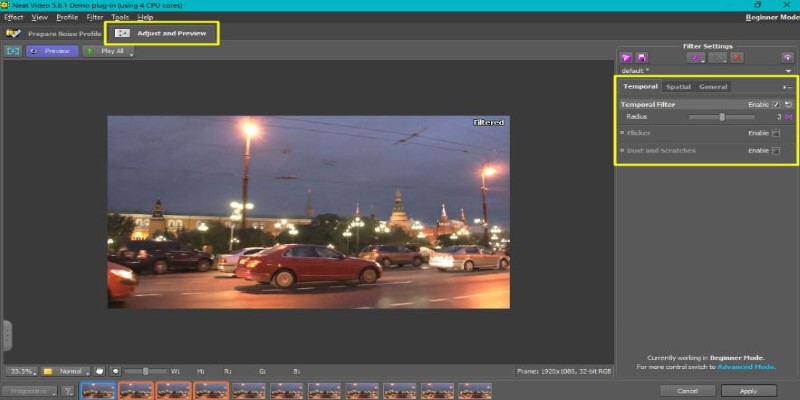
Once that profile is built, Neat Video does the heavy lifting. The preview window gives you a before-and-after split, and the difference is usually dramatic. You can then dive into the settings: adjust spatial filtering for fine details, tweak temporal settings for moving subjects, and control sharpening.
This plugin is most effective when applied early in the chain. For best results, apply it before color grading or effects. That way, you’re working with a clean signal and not amplifying noise during later stages. Some users make the mistake of grading first and then denoising, but that approach can make the plugin less effective and potentially lead to color artifacts.
One tip many editors miss is that if you're working with high ISO footage from the same session, you can save time by reusing the same noise profile. Just build it once and apply it to multiple clips. It’s fast, and it keeps your noise reduction consistent across the project.
Another use case is archival footage or old digital recordings. Neat Video doesn't just work on fresh clips—it's become a go-to for restoration projects. Home videos, documentaries with old footage, or even security cam recordings can benefit from this plugin's smart filtering.
Neat Video is not just about eliminating flaws—it’s also about enhancing clarity. When noise is removed properly, it becomes easier to see the subject, track motion, and apply effects. So, you’re not only fixing footage—you’re making it stronger for everything that comes next.
The Real-World Value of Using Neat Video
Neat Video brings serious value to real-world editing situations. Say you’ve got a rushed interview with poor lighting or high ISO—normally, that footage might end up looking too noisy to use. But with this plugin, you can turn that clip into something clean and presentable. That alone can save you from costly reshoots and long hours trying to patch things up in color grading.
It's especially useful in fast-paced environments like weddings, live events, or documentary shoots, where you don't always control lighting or camera settings. Neat Video gives you breathing room in post, acting like a safety net when conditions aren't ideal.
For content creators, especially vloggers or YouTubers, it can level up your output. Grainy phone footage or compressed screen recordings become cleaner, which helps keep your channel looking professional. In larger productions, Neat Video slides smoothly into the workflow without disrupting other effects or grading.
Clean footage also boosts morale—it's simply easier to edit and more enjoyable to watch. In a time when viewers notice every detail, having a Neat Video in your toolkit means you stay one step ahead. It's not just about removing noise; it's about protecting quality across the board.
Conclusion
Neat Video is more than just a noise reduction plugin—it's a safety net for video editors. It allows you to clean up imperfect footage without sacrificing quality. Whether you're working on interviews, events, or old archival material, it helps restore clarity and save valuable shots. Its precise controls, smart filtering, and consistent results make it a reliable tool in any editing workflow. For anyone serious about post-production, Neat Video is an essential asset that quietly delivers powerful results.
Related Articles
Everything You Should Know About 123Apps Online Video Editor

Free Online Screen Recorders with Simple and Fast Export Options
Comparing NTSC and PAL: Which Analog TV Format Was Better?

Discover the Top Password Managers to Keep Your Accounts Secure

How to Colorize Photos with Palette AI: A Step-by-Step Guide For beginners

Master AI Automation: 5 Ways to Automate Brain Pod AI Effectively
Free Tools to Convert HEX to RGB Codes for Designers and Developers
Top MKV Players for Mac 2025: Best for Smooth 4K Playback

Improve System Speed Fast Using These Top 5 PC Optimization Tools

Find Your Perfect Fit: The Best Appointment Schedulers and Booking Apps

The Best CRM Software for Real Estate Agents: Top Picks for 2025