 knacksnews
Best Audio Editors to Help You Produce Professional Podcast Episodes
Podcasts have become one of the most interesting types of media out there right now. Podcasts let show hosts connect with listeners in a real and personal way through stories and conversations. Audio clarity, on the other hand, is often what makes a listener stay or leave. It is where tools for changing podcasts come in handy. Picking the right audio editing software can make a big difference in how clear the sound is, how the episodes are organised, and the general quality of the production.
This guide explores the best audio editing tools available today, offering detailed insights into their features, pros, and ideal users—all from a third-person perspective. Whether someone is new to podcasting or looking to upgrade their editing suite, these tools provide reliable options for a professional finish.
Why Audio Editing Matters in Podcast Production
Podcast listeners expect clear, balanced, and interruption-free audio. Even if the content is compelling, poor sound quality can turn listeners away. Audio editing tools allow creators to:
- Cut out background noise
- Remove awkward pauses and mistakes
- Balance sound levels between speakers
- Add music, transitions, and effects
- Match volume to broadcasting standards
By using proper editing software, podcasters can elevate their show’s professionalism without needing a studio setup.
Audacity: A Reliable Free Option
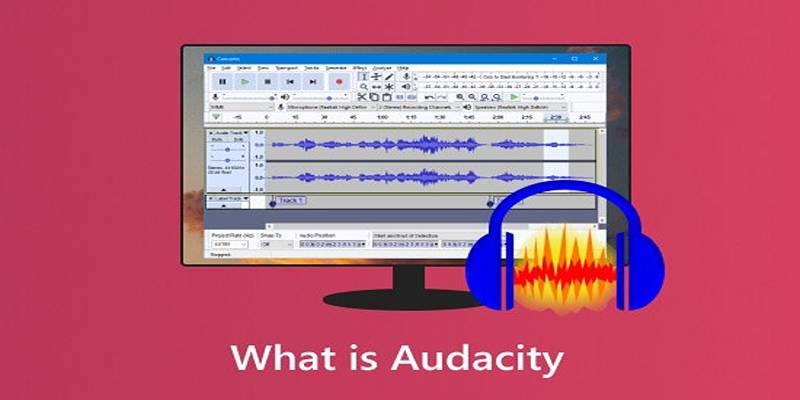
Audacity has long been a favorite among beginner podcasters due to its open-source availability and user-friendly interface. It offers a range of essential editing features without a price tag.
Key Features:
- Multitrack editing
- Noise reduction and equalization
- Exporting in MP3, WAV, and other formats
- Support for various plugins
Audacity provides everything needed to start a podcast, especially for creators who are just getting used to editing workflows. While its interface may seem a bit dated, its consistent updates and active user community keep it relevant.
Adobe Audition: A Professional’s Toolkit
For those seeking a more polished and advanced editing experience, Adobe Audition offers a complete set of professional-grade tools. As part of the Adobe Creative Cloud, it integrates smoothly with other Adobe applications like Premiere Pro.
Key Features:
- Real-time spectral editing
- Auto-ducking for music under voice
- Adaptive noise reduction
- Multitrack and waveform editing modes
Adobe Audition is ideal for detailed work, including voice cleanup, restoration, and post-production. Though it comes with a subscription fee, many professionals consider it a worthwhile investment.
GarageBand: A Solid Pick for Mac Users
GarageBand, pre-installed on all Apple devices, is a straightforward yet capable audio editor. Its drag-and-drop interface, music library, and podcast templates make it a go-to option for macOS and iOS users.
Key Features:
- Built-in sound library
- Easy-to-use visual interface
- Multitrack support
- Voice optimization settings
While GarageBand lacks some of the advanced features found in premium tools, its simplicity and quality make it a strong choice for solo creators or casual podcast projects.
Descript: Edit Audio Like Text
Descript is redefining the podcast editing experience. It converts audio into text, allowing users to edit their podcasts as if they were editing a document. Delete a word from the transcript, and it's removed from the audio—simple as that.
Key Features:
- Automatic transcription
- Filler word detection and deletion
- Audio and video editing
- Remote recording and screen capture
Descript is especially useful for solo podcasters or teams who want to streamline the editing process. It’s not only intuitive but also surprisingly powerful for its ease of use.
Reaper: Affordable Power for Intermediate Editors
Reaper is a full digital audio workstation (DAW) that provides extensive customization and professional-level features. It offers a generous free trial and a low-cost license afterward, making it accessible without sacrificing capability.
Key Features:
- Multitrack recording and mixing
- Real-time plugin support
- Scripting and automation
- Lightweight installation
Reaper might require a learning curve, but its vast feature set and flexible interface make it one of the most powerful audio editing tools available for its price point.
Hindenburg Journalist: Built for Podcasting
Unlike other DAWs built for music production, Hindenburg Journalist is designed specifically for spoken-word audio. It automatically optimizes voice levels and simplifies the workflow for editing interviews and episodes.
Key Features:
- Automatic level adjustment
- Voice profiler to enhance vocal tone
- Chapter markers and metadata embedding
- Direct publishing to podcast hosts
Hindenburg takes the hassle out of editing by focusing only on what podcasters need, making it a practical choice for creators who prioritize storytelling and efficiency.
Auphonic: Intelligent Audio Cleanup
Auphonic isn’t a traditional editor but rather an online audio processing tool that improves audio quality automatically. Users upload their finished recordings, and Auphonic applies intelligent enhancements to balance, clean, and optimize sound.
Key Features:
- Loudness normalization
- Noise and hum reduction
- Multitrack support
- ID3 tagging and chapter support
Auphonic is an excellent companion tool for creators who use manual editors like Audacity or Reaper but want a final layer of quality enhancement.
Key Factors to Consider When Choosing an Audio Editor
Selecting the right podcast editing tool depends on several factors. Creators should consider:
- Skill level – Beginners may prefer Descript or GarageBand, while advanced users benefit from Audition or Reaper.
- Budget – Audacity and GarageBand are free, while Adobe Audition and Hindenburg require a subscription or license.
- Platform – Compatibility with macOS, Windows, or online access can impact decision-making.
- Podcast format – For interviews, tools with voice balancing and transcription (like Descript) can save time.
Taking the time to assess needs and test available software can make the editing process more enjoyable and effective.
Conclusion
For podcast creators, audio editing is not just a technical task—it’s part of the storytelling craft. Whether someone is cleaning up a simple interview or producing a narrative-rich series, the right editing tool can help deliver a polished, engaging result. From free tools like Audacity to advanced platforms like Adobe Audition and innovative options like Descript, there’s a solution for every type of podcaster. By understanding the features and benefits of each software, creators can find the one that fits their workflow and creative goals. In the end, good content matters—but great audio keeps listeners coming back for more.
On this page
Why Audio Editing Matters in Podcast Production Audacity: A Reliable Free Option Key Features: Adobe Audition: A Professional’s Toolkit Key Features: GarageBand: A Solid Pick for Mac Users Key Features: Descript: Edit Audio Like Text Key Features: Reaper: Affordable Power for Intermediate Editors Key Features: Hindenburg Journalist: Built for Podcasting Key Features: Auphonic: Intelligent Audio Cleanup Key Features: Key Factors to Consider When Choosing an Audio Editor ConclusionRelated Articles

How to Colorize Photos with Palette AI: A Step-by-Step Guide For beginners
Flowframes Review: Revolutionizing AI Frame Interpolation for Videos
Online Engineering Tools: Free Converters for Every Measurement
Find Your Perfect Fit: The Best Appointment Schedulers and Booking Apps
Everything You Should Know About 123Apps Online Video Editor
Comparing NTSC and PAL: Which Analog TV Format Was Better?
The 8 Best ChatGPT Alternatives for Businesses and Content Creators
Best Audio Editors to Help You Produce Professional Podcast Episodes

How to Choose the Best Automation Software for Your Business: A Guide
Cloud-Based Spreadsheet Tips: Convert Excel to Google Sheets
Set Up Media Streaming with DLNA in Windows